Sponsors

Showing posts with label safari. Show all posts

Apple's Safari will fall first at hacker contest, past winner predicts


Share/Save/Bookmark
Apple Inc.'s Safari is the juiciest target in the upcoming PWN2OWN hacking contest, last year's winner predicted today.

"It's an easy target," said Charlie Miller, the vulnerability researcher who last year walked off with a $10,000 cash prize for breaking into an Apple laptop just a few minutes into the contest. PWN2OWN is slated for its third appearance at the CanSecWest security conference later this month in Vancouver, British Columbia.

"It might be because I'm biased about the things I'm good at, but it's the easiest browser [to hack]," Miller said.

PWN2OWN's sponsor, 3Com Inc.'s TippingPoint unit, will pay $5,000 for each new bug successfully exploited in Safari, Microsoft Corp.'s Internet Explorer 8, Mozilla Corp.'s Firefox or Google Inc.'s Chrome. IE8, Firefox and Chrome will be running on a Sony notebook powered by Windows 7, Microsoft's still-under-construction operating system, while Safari and Firefox will be available on a MacBook.

"Apple's products are really friendly to users, and Safari is designed to handle anything, including all kinds of file formats," said Miller. "With a lot of functionality comes the increased chance of bugs. The more complex software is, the less secure it is."

Another factor making Safari easy pickings, said Miller, is Apple's Mac OS X, which lacks the workable defenses found in Windows Vista and Windows 7, including address space randomization -- which Microsoft calls "address space layout randomization," or ASLR.

Put Safari atop Mac OS X, and the target's too good to pass up, said Miller.

IE8 and Firefox will escape unscathed, Miller predicted, adding that a quick cost-benefit analysis tells him they'll be safe. "They make it so hard that, for me, $5,000 isn't motivation enough to try to break one of those guys," he said. As for Chrome, he pleaded ignorance, saying that he didn't know enough about the browser to even provide a prediction. His gut instinct, however, is that Google's browser will also survive.

Miller has also been sharpening his mobile device vulnerability and exploit skills -- he was the first researcher to uncover a security bug in Google's Android operating system -- and therefore will take a stab at the second PWN2OWN contest. That challenge will pit researchers against five smartphone operating systems, including Windows Mobile, Android, Symbian, and the operating systems used by the iPhone and BlackBerry.
TippingPoint will pay double, or $10,000, for each bug exploited at the contest.

"I'll be trying to break Safari," said Miller. "If I say it's easy, I have to try, right? But I also want to show my stuff on mobile."

He declined to say which smartphone he will target. It's likely, however, that he'll be looking at the iPhone; Miller was one of three researchers who found the first iPhone vulnerability, just weeks after the device's mid-2007 debut.

Nor would Miller get specific about the vulnerabilities he has in mind or is investigating. "You pretty much have to show up [with a vulnerability and exploit] and be ready to go," said Miller. "The great thing about PWN2OWN is that it's not just about finding bugs, but about finding bugs that can be exploited, and then coming up with an exploit."

Miller works as a principal analyst at Independent Security Evaluators LLC, a security consulting firm, and said he is looking forward to the contest, which kicks off March 18. "I have to defend my championship, don't I?"

(source)

--------------------------------------------------------

If you like this post please Bookmark it and comment bellow. To recieve new updates and other posts like this please subscribe via RSS or via Email.

Recent Articles:

--------------------------------------------------------

Share/Save/Bookmark

Safari’s new tabs: Good or bad?


Share/Save/Bookmark
As you’ve no doubt heard, Apple released a beta version of Safari 4 earlier this week. Among the new features in this pre-release is a major overhaul of the program’s interface. While Windows users seem to be quite pleased with many of these interface changes, as the Windows version now looks much more like a native Windows application, Mac users are voicing mixed reactions. Perhaps the most controversial change in Safari 4 for the Mac is a new approach to tabbed browsing that places tabs at the top of the window—replacing the traditional title bar—rather than in a dedicated tab bar.

I’ve been using Safari 4 since early Tuesday, and while that’s admittedly a short time, it’s long enough to get a feel for how these tab changes affect both browsing and window management. Here’s a quick look at the good, the bad, and the in between.

(If you prefer Safari 3’s approach to tabs, it turns out you can change a hidden setting to use that interface. Rob Griffiths covers a number of other ways to tweak Safari 4's interface.)

The good

While Safari 4’s tab interface is generating some criticism, it does provide benefits compared to Safari 3:
  • The address bar, toolbar buttons, search field, and bookmarks bar now appear within each tab, rather than at the top of the Safari window. This makes logical sense, since the functions these items perform are specific to the currently-visible tab, rather than to all tabs.

  • By essentially combining the tab bar and the title bar, Safari 4 gives you a bit more vertical space for Web-page content. It’s a small bit—two or three lines of text on a typical Web page—but it’s there.

  • The new “handle” that appears in the upper-right corner of each tab makes it more obvious that you can drag tabs to rearrange them. (On the other hand, these handles look like Mac OS X resize handles, rather than items used to move objects. And hiding the handle, as well as each tab’s close button, for non-active tabs lessens the effectiveness of the change).

  • Assuming you have the bookmarks bar hidden, moving the tab bar to the top of the window—along with other changes, such as moving the reload button into the address field—makes the “browsing” area of Safari’s window look more like Mobile Safari, increasing interface consistency between the two.

Almost there...

  • Given that the title bar has been replaced by the tab bar, Apple got Safari's behavior mostly right when it comes to moving a window when you can see only the top of it. Despite what you might expect, you can click (almost) anywhere on the tab bar and drag the window around without selecting the tab on which you clicked. This is the right approach, as it means that when a Safari window isn't frontmost, the tab bar acts like a traditional title bar.

    Unfortunately, I had to write "mostly" and "almost" in the previous paragraph. It turns out the behavior of a background Safari window differs depending on where on a tab you click-drag. If you click-drag on the center of any tab, the window moves as expected. But if you click-drag a tab's move handle—which is invisible until your cursor is directly over it, so it's easy to accidentally hit—you switch windows, the clicked-on tab is selected, and that tab moves instead of the entire window. Alternately, if you click-drag on the tab's close circle—also invisible until just before you hit it—nothing happens at all. There's a logic here once you figure it out, but it's so obscure that I think the typical user will simply wonder why Safari doesn't seem to behave consistently.

The bad

The benefits of this new approach to tabs don’t come without costs. After a couple days using Safari 4, it’s clear there are drawbacks, as well:
  • The loss of a window-wide title bar is a departure from two decades of Mac OS interface standards. You no longer have a distinct title bar for grabbing and moving a window. Instead, to move a Safari 4 window, you grab a tab. This works, but it’s a little sad to see such inconsistency from a company that, with a few exceptions, has embraced interface consistency as a key to ease of use.

  • By replacing the traditional title bar with tabs and a New Tab button, Safari 4 is the new poster child for “click-through” problems—the phenomenon where clicking on a background window not only brings that window to the front but also passes your click through to the window, potentially performing another action. Specifically, if you click on the “title bar” of a Safari 4 window that’s currently behind other windows, that click also activates the particular tab or button on which you clicked, bringing a particular tab to the front or, more disruptively, creating a new tab. The result is that you must now be cognizant of where in the title bar of a Safari window you click. The corollary is that if you don't want to accidentally select another tab, the size of the target for your bring-forward click is inversely proportional to how many tabs you have open.

  • The only way to move a tab in Safari 4 is to grab the tiny handle in the tab’s top-right corner. The reason for this is obvious: because top-mounted tabs replace the traditional window title bar, grabbing any tab’s title replaces the “grab the title bar to move the window” action. So Apple had to come up with a new way of moving tabs. Unfortunately, the small size of this handle makes it more difficult—and more RSI-inducing—to perform this action.


These are actually two different Safari 4 windows.
  • If you’ve got a window without tabs in front of a window with tabs, the resulting appearance can be confusing, as you can see in the image to the right.

  • In Safari 3, you could control/right-click on the title of the current window to browse higher levels of the current Web page’s site; this feature is gone in Safari 4, since the tab and title bar are one and the same and tabs already have their own contextual menu.
  • As Daring Fireball's John Gruber pointed out, it’s no longer as easy to drag a URL to a Safari window to create a new tab for that URL. With Safari 3, you could just drag a URL to any open area of the tab bar. Now you must drag the URL to a tiny, tiny sliver along the left-hand edge of the New Tab button. And since there’s no distinct indicator that you’re dragging a URL onto that button, rather than onto the right-most tab, it’s far too easy to accidentally drag the URL onto that tab instead—which, of course, replaces the tab’s contents.

  • If you tend to click on tabs more often than you use the bookmarks bar, the new interface requires more mousing. (Since the tab bar isn’t at the very edge of the screen—you’ve still got the menu bar above it—there’s little Fittsian advantage to placing the tab bar at the top of the window.)
  • Finally, there are areas where Safari 4’s melding of the title bar and the tab bar just doesn’t look right. For example, as shown to the right, there’s no separator between the left-most tab and the area of the title bar containing the close, minimize and zoom buttons. This makes it appear as if those buttons affect only the left-most tab, when they’re actually window-wide controls.

Work in progress

Keep in mind that we're talking about a beta version of Safari 4, and the first publicly available beta at that. So it’s possible many of these behaviors could change as Apple tweaks the program for its official release. In fact, there’s evidence Apple used feedback on beta versions of Safari 3, first released back in 2007, to refine the final product, released several months later. (You can submit suggestions and bug reports for Safari 4 by clicking on the Bug button in the toolbar.) So no one should make final judgements about Safari 4 based on a couple days’ use of the beta. But at the same time, I think there are valid interface complaints that go beyond “it’s different.”

Of course, an interesting question is, “Why did Apple make these changes to tabs?” Jason Snell thinks the Safari team was spurred by Google’s Chrome. Frequent Macworld contributor Andy Ihnatko speculates that it’s a step towards making Safari more suitable for a possible tablet Mac. I think both theories have some merit, although I also think the Safari team was trying to make tabs and their features more obvious to people who may not use them frequently. I’m hoping that between now and the final release of version 4, Apple can accomplish that goal while addressing some of the beta’s shortcomings.

--------------------------------------------------------

If you like this post please Bookmark it and comment bellow. To recieve new updates and other posts like this please subscribe via RSS or via Email.

Recent Articles:

--------------------------------------------------------

Share/Save/Bookmark

Hands On: Apple Safari 4 Beta


Share/Save/Bookmark
Apple today launched the first beta of Safari 4, the new version of its web browser for both Windows and Mac OS X computers. Safari 4 brings a lot of new features, including full history search, a smart address field, and full-page zoom. Apple also claims that Safari 4 runs much faster due to its new JavaScript engine.


The Safari 4 Beta is available for download from Apple's Web site; it will set you back about 107MB of disk space. I gave Safari 4 a spin, and while I noticed quite a few elements 'borrowed' from Google's Chrome browser, I was impressed with Apple's offering.


One of the most noticeable changes is the new Top Sites feature, a page that displays your most visited or favorite sites. It can be configured as either your home page or as a page you see every time you open a new tab. Chrome offers a similar feature, but Apple's iteration offers more eye candy, with a 3D display and its iPhone-like ability to rearrange sites. Pages that have been updated since you last visited them, will be marked with a blue star in the corner.


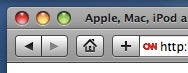
Safari 4's title bar also gets a Chrome-like look, with new tabs displayed there, instead of in a traditional tabs bar under the address field--making better use of your screen real-estate. Tabs can be rearranged, or you can drag them out and create new browser windows. And, as in previous versions, Safari 4 can merge all of your open windows into one multi-tabbed window.


Your browsing history is now brought to life with Cover Flow, so you can flick through your recently visited Web pages like you do with your album art in iTunes. The new Full History search feature can prove to be extremely useful, as it goes through all of the pages you have previously browsed and the text they contain. If you know you saw a certain term somewhere, but you can't remember where, you can simply search for it, and all pages containing it in their body text and name will be displayed.


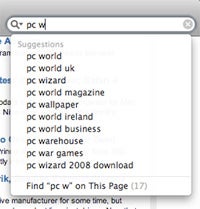
The Smart Search Field in Safari 4 is now integrated with Google Suggest, and one you start typing, the field suggests search strings. This means you'll no longer need Safari plugins, like Inquisitor, to get this kind of functionality. The Full Page Zoom feature lets users zoom in and out on a page (by using keyboard shortcuts or menus) without distorting a page's layout or losing quality. Mac users were able to perform a similar task before, but now it's available to both PC users, too.


As for speed, Apple claims Safari 4 is the world's fastest browser. While I can't verify that claim, I can say that the new browser, running JavaScript 4.2, surely feels faster and page-loading time is indeed shorter. Safari 4 also includes HTML 5, a technology that allows wed-based applications to store information locally without an Internet connection.


I really like the new version of Safari. It definitely feels faster--an improvement that alone should give headaches to Microsoft and Mozilla. Add in the other nifty features and eye-candy Safari 4 brings, like Cover Flow, and this browser should give them plenty to think about.


Even though some of Safari 4 new feature seem like they are borrowed from competitors' applications, it clearly sets itself apart as a top-class Web browser. Meanwhile, if you would like to browse the Internet, iTunes style, you can download the Safari 4 beta from Apple's site. After you do, come back and tell me what you think.


--------------------------------------------------------

If you like this post please Bookmark it and comment bellow. To recieve new updates and other posts like this please subscribe via RSS or via Email.

Recent Articles:

--------------------------------------------------------

Share/Save/Bookmark

Apple Issues Big Patch Load For Mac OS X, Safari


Share/Save/Bookmark
Apple (NSDQ:AAPL) released its first security update for 2009, with at least 27 fixes addressing 45 security glitches in Mac OS X, open source and its Safari browser. Altogether, Apple's patch load incorporated multiple fixes for its Safari Web browser, AFT Server, Apple Pixlet Video CarbonCore, CFNetwork, Certificate Assistant, network Time, Printing, Remote Apple Events, perl and python programming languages, servermgrd, SMB file and SMB server, SquirrelMail, X11 and XTerm.
Included in Apple's security update were fixes aimed at repairing flaws in its Safari Web browser. The patch fixed multiple validation issues in the way the browser handles feed: URLs, which, if left unpatched, could allow attackers to execute arbitrary JavaScript. The update addresses the flaw with improved handling of embedded JavaScript, Apple said in its advisory.
Meanwhile, Apple's latest security update patches at least 22 errors in its Mac OS X operating system that resolved issues ranging from video flaws to programming language glitches. One of the OS X glitches repaired with its security bulletin was a memory corruption error in the Apple Pixlet Video codec, which could lead attackers to launch malicious code on affected systems if users opened a maliciously crafted movie file.
Also included in the patch load were fixes for errors in CoreText, Common Unix Printing System and perl and python programming languages -- all of which could lead to remote code execution. It also updated its SquirrelMail to version 1.4.17 to address a cross-site scripting issue, among others.

The update repaired a slew of vulnerabilities in its open source ClamAV antivirus software distributed with Mac OS X Server systems, the most serious of which could also open the door for an attacker to launch a malicious attack remotely.
Apple repaired buffer overflow vulnerabilities and memory corruption errors in its Server Message Block function, which could lead hackers to execute remote code or completely shut down an affected system if a user connects to a maliciously crafted SMB file system or file server.
While Apple does not rank its patches by their severity, other software companies designate a flaw that enables remote code execution to be a critical vulnerability.
Apple's security update also addressed less severe vulnerabilities. Other patches for the Apple's AFP Server fixed vulnerabilities that could lead to denial of service attacks, while the fix for Remote Apple events addressed an issue that could lead to unexpected application termination or unauthorized information disclosure.
Another patch for Apple's Printing function prevented local users from obtaining system privileges due to a heap buffer overflow vulnerability resulting from a handling error, while a patch for the servermgrd prevented remote attackers from being able to access the Server Manager without authorization.


--------------------------------------------------------

If you like this post please Bookmark it and comment bellow. To recieve new updates and other posts like this please subscribe via RSS or via Email.

Recent Articles:

--------------------------------------------------------

Share/Save/Bookmark